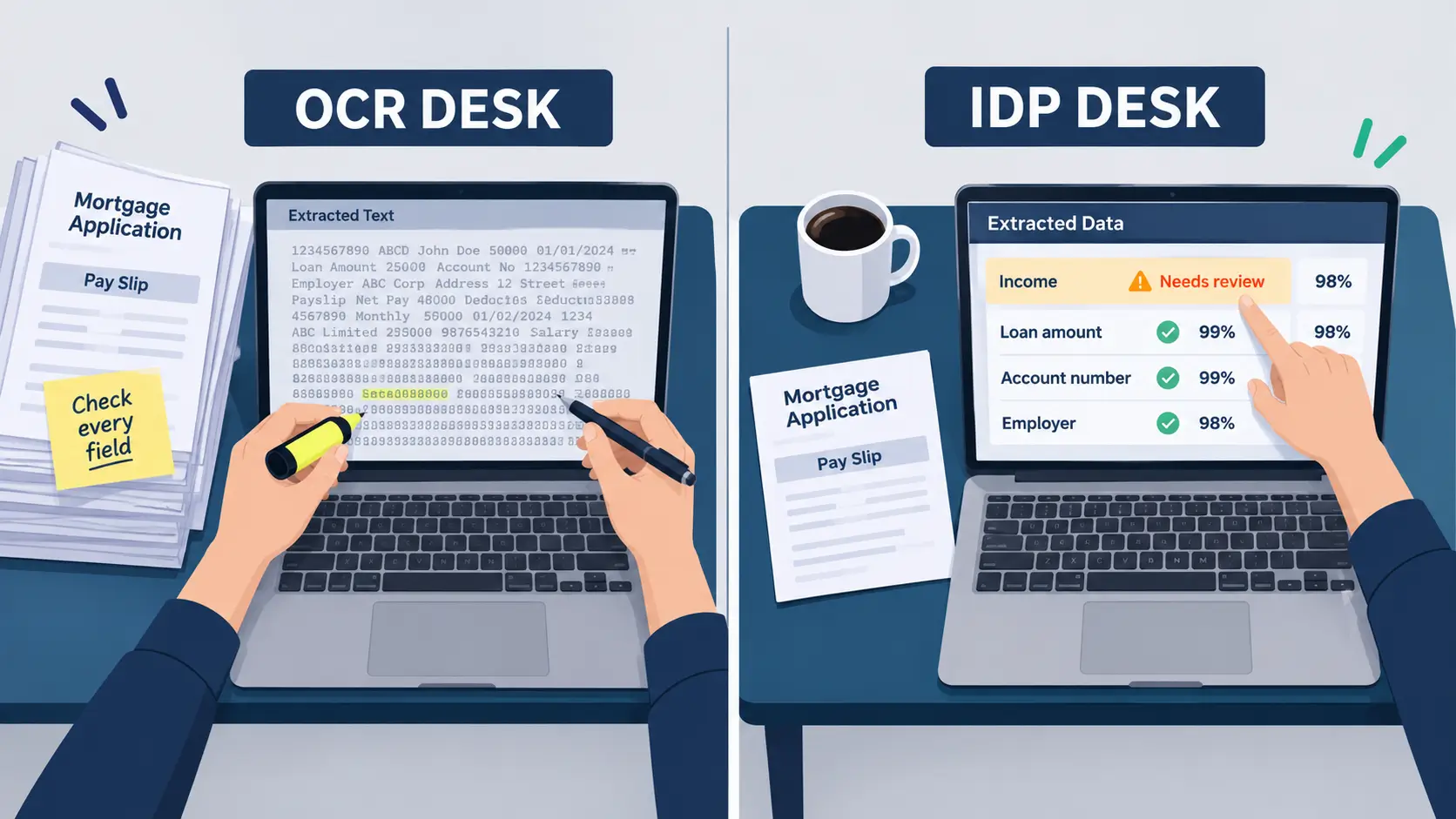
A mortgage application lands in two inboxes at 9:00 on a Monday. The same 14 pages, the same blurry pay slip, the same handwritten note in the margin. Both inboxes belong to operations teams at mid-size lenders. One team uses an OCR tool. The other runs an intelligent document processing pipeline.
At the end of the day, both teams have read the document. Only one of them knows which values are safe to send into the lending system. That is the real answer to OCR vs intelligent document processing: OCR turns the page into text, while intelligent document processing (IDP) turns the text into fields, scores how likely each one is correct, and decides who needs to look at it.
Follow the application through both desks, one stage at a time, and the difference becomes concrete.
Key takeaways
- OCR outputs text. IDP outputs structured fields with a confidence score and a routing decision attached to each one.
- Microsoft defines field confidence as an estimated probability that a prediction is correct and recommends near-100% accuracy for financial and medical records.
- AWS documents rules that route low-confidence or missing fields to human reviewers, plus random sampling for audit.
- The manual-check problem usually comes from missing routing logic, not from poor character recognition.
- Plain OCR still fits low-volume, low-risk work where a person reads every output anyway.
Stage 1: The page becomes text
At the OCR desk
The OCR engine does its job well. It converts every page into machine-readable characters, and many engines also report a confidence value for each word or line. Microsoft’s Read OCR model, for example, extracts printed and handwritten text as lines and words, each with its own confidence score. This highlights a key distinction in OCR vs Intelligent Document Processing: OCR captures the text, while the OCR team receives a long block of machine-readable content that mirrors the layout of the scanned pages.
At the IDP desk
The pipeline runs the same character recognition first. IDP usually contains OCR, so at this stage the two desks look almost identical. If your document automation comparison stops here, the tools seem equal, which is why so many ocr vs idp evaluations end with the cheaper option.
Stage 2: Text becomes fields
At the OCR desk
The text says “Net pay 4,820” on page three and “4,280” in a footnote on page five. The OCR tool does not know which number is the applicant’s income, or that either one is income at all. A team member opens the file and decides.
At the IDP desk
The pipeline classifies the document as a mortgage application, finds the pay slip inside it, and maps “Net pay” to the income field. This is intelligent document processing explained in practice: classification and field extraction turn a page of characters into named values such as income, employer, account number and loan amount. The same step sits at the center of intelligent document processing in healthcare data pipelines, where clinical forms take the place of pay slips.
Stage 3: Each value earns a trust score
This is the stage where the two desks split for good, and where the OCR vs intelligent document processing choice is really decided.
At the OCR desk
The OCR tool can say it is 97% sure about the characters “4,820.” It cannot say whether 4,820 belongs in the income field. There is no field-level score and no rule for what counts safe, so the only defensible option is to check every field. The team stopped typing, but it never stopped reviewing.
At the IDP desk
Each extracted field carries its own confidence score. Microsoft’s Document Intelligence documentation defines field confidence as “an estimated probability between 0 and 1 that the prediction is correct”, where 0.95 means the value is likely correct 19 times out of 20 (Microsoft Learn, updated April 2026).
The same page recommends targeting accuracy of 80% or higher, and close to 100% for sensitive financial or medical records. That is the core of confidence scoring document AI: a number attached to meaning, not just to characters, that the workflow can act on.
The IDP team does not use one threshold for the whole application, because confidence scoring document AI only pays off when the threshold matches the field. They set it per field, based on the damage a wrong value would cause. The tiers below are a starting point we use in design workshops, not a vendor standard, and every team should validate its own cut-offs on labeled samples.
| Field tier | Example fields | Starting rule |
| Money-moving | Account numbers, payment amounts, IBAN or routing numbers | Auto-accept only near 1.0 and after validation checks pass |
| Decision-driving | Income, loan amount, policy number, claim value | High threshold; review any value below it or any failed cross-check |
| Reference | Names, addresses, employer | Moderate threshold; review when low or missing |
Still Checking Every Field Your OCR Tool Reads?
We add field-level confidence scoring and review rules to your document workflow, so your team checks only the values that carry real risk.
Stage 4: Someone decides who looks at what
At the OCR desk
Review happens outside the tool, by habit. The whole application is the unit of review, so a clean file and a messy file take roughly the same time. When volume spikes at quarter end, the queue grows and errors creep in from tired reviewers rather than from the software.
At the IDP desk
The pipeline routes only doubtful items to a person. AWS documented this pattern in its Amazon Augmented AI (A2I) activation conditions for Amazon Textract, which create a human review task in three cases: a key field’s confidence falls inside a set range, an important field is missing, or a document is picked in a random audit sample.
One note for buyers: that AWS page now states that A2I is no longer open to new customers. The pattern still holds, and it is the behavior to demand from any idp for financial documents, whether the review queue runs on a cloud service or inside your own workflow tools.
The IDP team’s reviewers see the source snippet, the extracted value, its score, and the reason it was flagged on one screen. A missing income field goes straight to review. A confident value that fails to a cross-check, such as monthly figures that do not add up to the annual total, goes there too.
Turn Confidence Scores into Review Queues
We build IDP pipelines that route low-confidence and missing fields to the right reviewer, with audit sampling built in from the first release.
Stage 5: Data lands in the system of record
At the OCR desk
Values reach the lending system after a person has typed or confirmed them. The record is accurate, but the speed of gain over manual entry is smaller than the business case promised, and nobody can say which fields were risky and which were routine.
At the IDP desk
Most fields flow straight through, the flagged few arrive after review, and every correction is logged. Those corrections feed retraining and show which thresholds are too loose or too strict. Over time, the share of fields needing a person shrinks, and the team can prove it. This measurable straight-through processing is what wider AI and automation in BFSI operations depends on.
The end-of-day scorecard for OCR vs intelligent document processing
Put the two desks side by side and the ocr vs idp comparison reads like this.
| What happened | OCR desk | IDP desk |
| Page to text | Done well | Done well, same step |
| Text to named fields | Manual, by a person | Automatic classification and extraction |
| Trust score | Per word, not tied to meaning | Per field, tied to business risk |
| Who reviews what | Every field, every file | Low-confidence, missing and sampled fields only |
| Validation | Whatever the reviewer notices | Rule-based cross-checks on totals, dates and formats |
| Learning | Vendor engine updates | Reviewer corrections feed retraining |
Which desk fits your volume
The OCR setup is not wrong for every team. If you are digitizing archives, making scanned PDFs searchable, or handling a few dozen documents a week that a person reads anyway, OCR does what you need at lower cost and complexity. In the OCR vs. Intelligent Document Processing comparison, traditional OCR is often the more practical choice when text extraction is the only requirement and there is no need for automated data interpretation or workflow decisions.
The IDP setup earns its cost as volume rises, as document types multiply, and when extracted values feed payments, underwriting or claims directly. That is where most financial services teams are heading, and why IDP for financial documents is now a core part of BFSI technology solutions. Grand View Research projects the intelligent document processing market will reach USD 12.35 billion by 2030 at a 33.1% CAGR from 2025, with BFSI holding the largest revenue share in 2024 (Grand View Research, November 2024). ViitorCloud shares insights on AI and automation through its company updates.
The vendor field is crowded. Gartner’s 2026 Magic Quadrant for Intelligent Document Processing describes a market with over 100 vendors (Gartner, September 2026), so any serious document automation comparison must look past recognition accuracy to the routing and review layer.
Six questions to ask in your next vendor demo
Procurement teams often see a polished extraction demo on clean documents. These questions are intelligent document processing explained from the buyer’s side. They moved the conversation to the stages where the two desks diverged.
- Does confidence come per field or per word? Ask to see the score on a named field, such as income or claim amount.
- Can thresholds differ by field? A single document-level threshold either floods review or lets risky values through.
- What happens when a required field is missing? It should trigger review automatically, not pass through empty.
- Can we sample auto-accepted documents for audit? Without sampling, you cannot measure the errors the system makes quietly.
- What does the reviewer see? Look for the source snippet, value, score, and flag reason on one screen.
- Where do corrections go? They should feed retraining and threshold tuning; with a log your auditors can read.
Take These Six Questions to Your Next Vendor Demo
We help procurement and operations teams test IDP vendors on real documents, set field thresholds, and build the review layer around the tool you choose.
Move one document type off the OCR desk
Start with one high-volume document, such as mortgage applications or claim forms, and list the fields it feeds into your core systems. ViitorCloud’s AI-driven automation team builds the decision layer around those fields, with per-field thresholds, review queues and audit sampling, so your team checks only the values that need a person. If your team is still working at the OCR desk after weighing OCR vs intelligent document processing, talk to us about moving one document type across.

Vishal Shukla
Vishal Shukla is Vice President of Technology at ViitorCloud Technologies.
Frequently Asked Questions
What is the main difference between OCR vs intelligent document processing?
OCR converts images of text into machine-readable characters. Intelligent document processing uses OCR as a first step, then classifies the document, extracts named fields, scores each field's confidence and routes low-confidence or missing values to human review. OCR gives you text; IDP gives you structured, validated data and a decision about which values can be trusted.
Does OCR provide confidence scores?
What confidence threshold should I use for financial documents?
Is IDP worth it for low document volumes?
Can IDP fully remove human review?