


Museum Collection Management Software for MAP
| Client | Museum of Art and Photography (MAP), Bangalore |
| Industry | Cultural Heritage, Museums and Art |
| Services | UI/UX Design, Web Development, Technology Consulting, DevOps Services, Quality Assurance |
| Stack | Electron JS, HTML, CSS, Node.js, AWS SES |
| Scale | More than 9,000 artifacts digitized and made browsable |
Project Overview
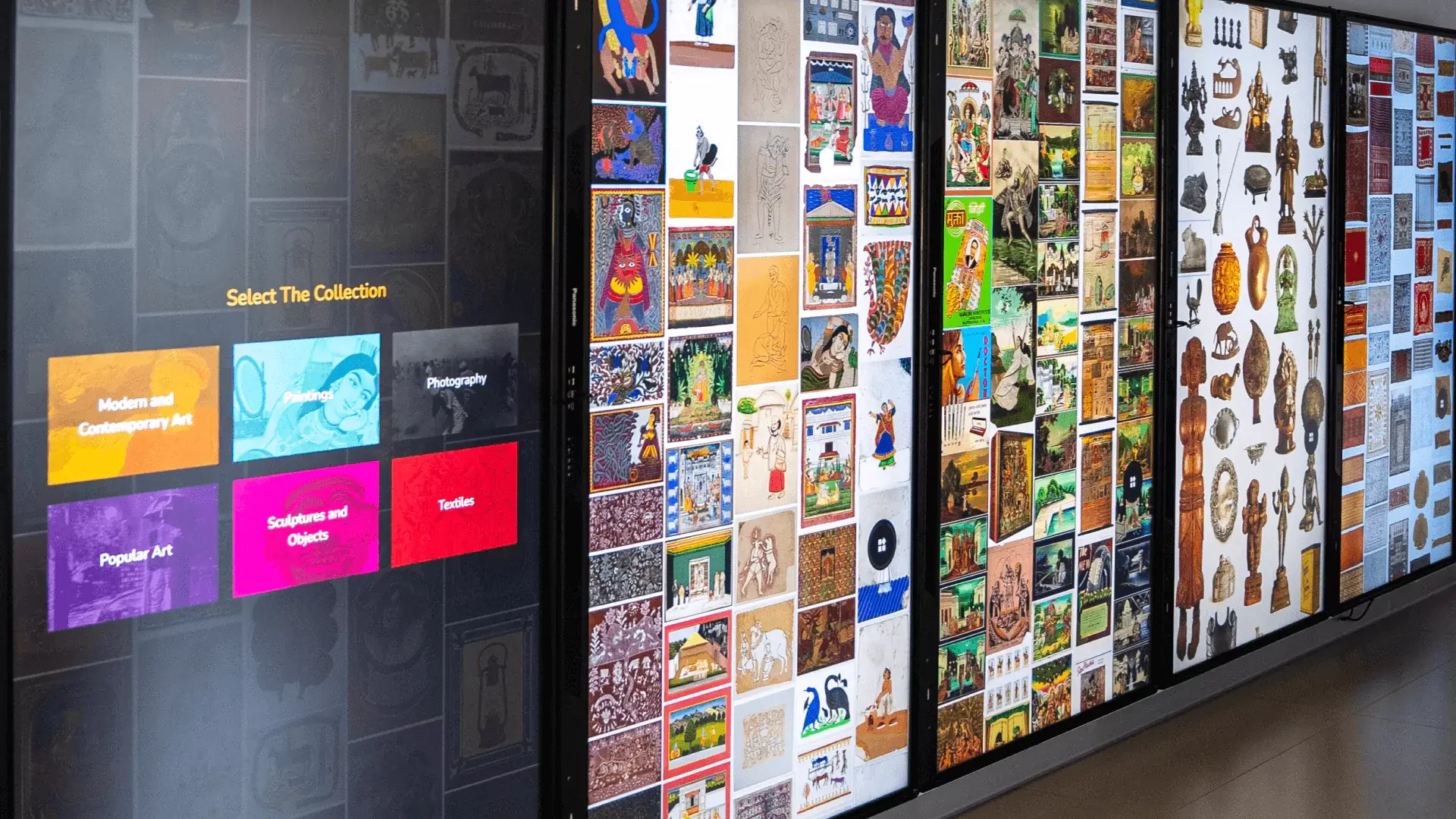
ViitorCloud built the MAP Collection Experience, a desktop application that brings museum collection management software to the Museum of Art and Photography, letting visitors browse more than 9,000 digitized artifacts with full-screen viewing and zoom.
The Challenge
The Museum of Art and Photography in Bangalore holds a collection of more than 9,000 artifacts: art portraits, models, and other works that most people would never see in person. Physical display space is finite, and a collection at that scale cannot all hang on a wall at once. The museum wanted a way to open the full collection to visitors without limiting access to whatever happened to be on show that week.
The core problem was scale. Putting more than 9,000 high-resolution artifacts into a single application that stays responsive is harder than it sounds. The museum needed digital collection management software, closer to a digital catalog software platform than a website, that could store and display the whole archive efficiently, let people examine individual pieces in detail, and give visitors a way to keep track of works they cared about. A slideshow would not do it; this had to feel like exploring a real collection.
Without a working solution, the collection stayed locked behind the constraints of physical space, and the museum had no scalable way to share its archive with a wider audience.
The Solution
ViitorCloud approached this as a desktop application development project rather than an off-the-shelf museum software install, with each decision made to handle the size of the collection and the way people browse art.
-
Electron JS for a true desktop application: We built the experience on Electron JS with an HTML and CSS frontend, so the museum gets a single installable desktop app that runs the full collection locally rather than depending on a browser session or constant connectivity.
-
Node.js backend for the collection: Node.js handles the catalog of more than 9,000 artifacts and the logic behind browsing, so the application stays responsive as visitors move through the archive.
-
Full-screen view and zoom: Each artifact can be opened full-screen and zoomed into for a close look at detail, which is the difference between viewing a thumbnail and studying a work of art.
-
AWS SES for personal collections: We integrated AWS SES so visitors can add works to a personal selection and receive the details of those artifacts by email, giving them something to take away after they leave.
The honest difficulty. The hard part was making more than 9,000 artifacts feel browsable rather than overwhelming. Digitizing the works was only the start; the application had to load and render high-resolution images on demand, support smooth full-screen viewing and zoom, and keep navigation fast across the whole archive. Most of the engineering effort went into handling that volume gracefully so the experience stayed quick no matter how deep a visitor went into the collection.
Value Proposition
What the MAP Collection Experience gives the museum:
-
Wider access to the full archive: Visitors can explore the entire collection of more than 9,000 artifacts, not only the pieces currently on physical display.
-
Detailed, close-up viewing: Full-screen mode and zoom let people examine individual works in detail, recreating the act of looking closely at art.
-
A personal connection that lasts: Email integration lets visitors save and receive details of work they liked, extending engagement beyond a single visit.
The Results
What the application delivers:
-
More than 9,000 artifacts are digitized and browsable: in one desktop application, opening the full collection to visitors in a single place.
-
Full-screen viewing and zoom on every work,: so visitors can study artifacts in detail rather than glancing at thumbnails.
-
Email-based personal collections: through AWS SES, letting visitors save selections and receive artifact details directly.
Conclusion
The MAP Collection Experience turns a physical archive of more than 9,000 artifacts into something a visitor can explore in full. By packaging the collection as a responsive desktop application with full-screen viewing, zoom, and email-based personal selections, ViitorCloud helped the Museum of Art and Photography make its collection accessible far beyond the gallery walls.
Want to Open Your Collection to a Wider Audience?
If your archive is larger than your display space, a well-built digital experience can put the whole collection in front of your audience. Talk to the ViitorCloud team about your project or explore our SaaS product engineering services.
Technology Stack
| Layer | Technology | Why it was chosen |
|---|---|---|
| Application shell | Electron JS | Packages the collection as a single installable desktop application that runs locally |
| Frontend | HTML, CSS | Builds the browsing, full-screen, and zoom interface for examining artifacts |
| Backend | Node.js | Manages the catalog of 9,000+ artifacts and keeps navigation responsive |
| AWS SES | Sends artifact details to visitors who save works to a personal selection |
Services
-
UI/UX Design
-
Web Development
-
Technology Consulting
-
DevOps Services
-
Quality Assurance
Industry
-
Cultural Heritage, Museums and Art
FAQs
What is the MAP Collection Experience?
The MAP Collection Experience is a desktop application built by ViitorCloud for the Museum of Art and Photography in Bangalore. It digitizes more than 9,000 artifacts and lets visitors browse the collection, view works full screen, zoom in for detail, and save selections by email.
Which technologies power the MAP Collection Experience?
How does the application handle more than 9,000 artifacts?
Who is the MAP Collection Experience built for?
Have a query, an idea, or want to connect?
Fill out this form to drop us an email, and we will reach out to shape something extraordinary.