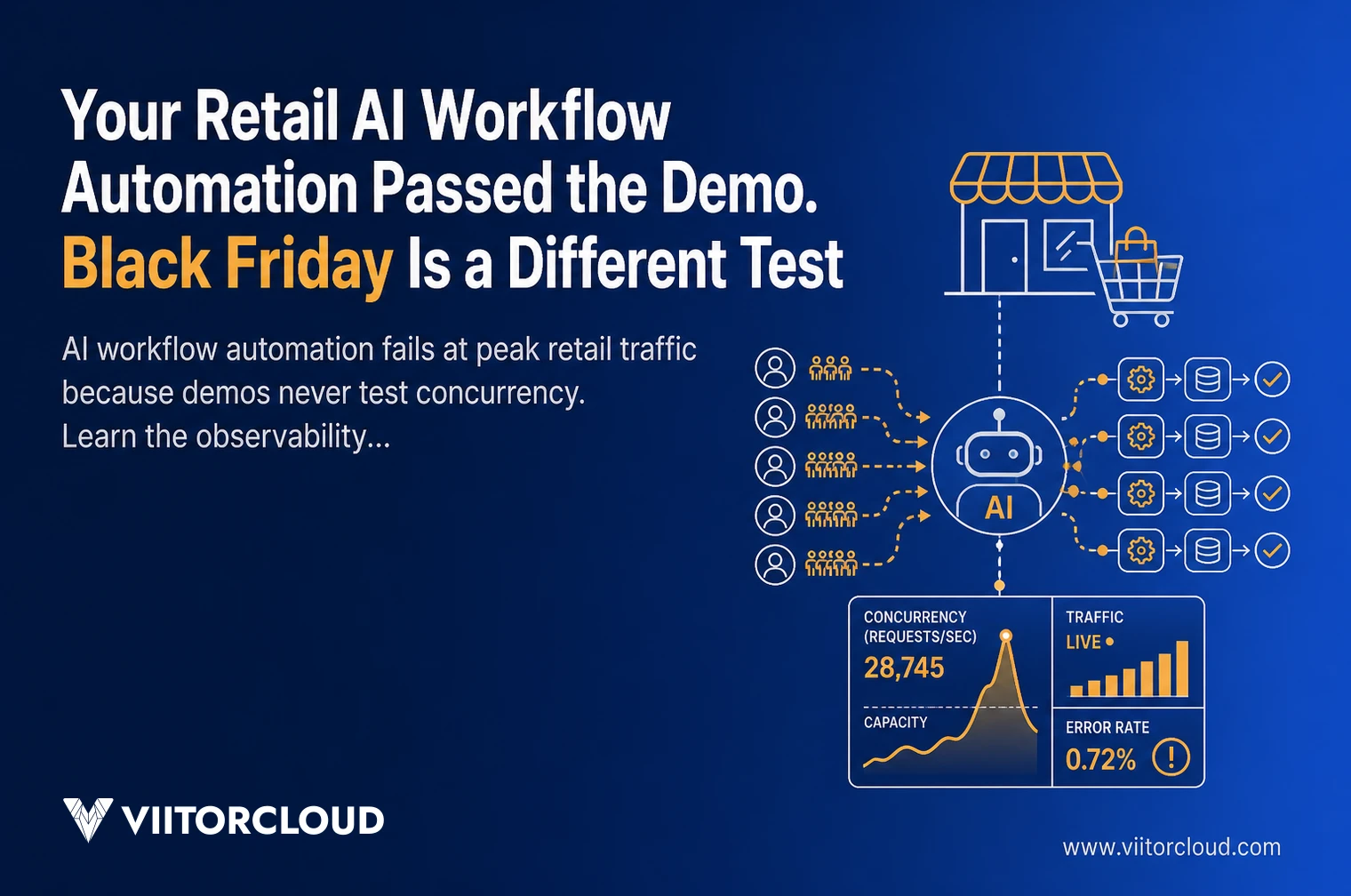
Retail AI workflow automation fails at peak load for a specific reason. The demo proved the model was accurate. It never proved the system holds at 40 times the concurrency, with cold caches, throttled upstream APIs, and a queue that stops draining. Those are two different tests, and only one of them runs in late November.
I have had this conversation with enough retail engineering leaders to recognise how it starts. The pilot looked excellent in September. By the last week of November, p99 latency had tripled, the recommendation service was serving stale results, and someone was restarting a worker pool at 2 a.m. The model was fine. The system around it was never engineered for real traffic.
Here is what actually breaks in retail AI workflow automation under load, what to instrument before peak season, and how to test the parts that fail first.
Key Takeaways
- A demo validates model accuracy at low concurrency. Peak season tests tail latency, queue depth, and failure isolation, none of which a demo touches.
- RAND research finds that more than 80% of AI projects never reach production, and engineering for real traffic is what separates the ones that do.
- AI workflow automation needs four classes of observability signal in production: infrastructure, model quality, cost and token telemetry, and step-level agent monitoring.
- Real-time inference scales through caching, batching, and pre-agreed load shedding. Autoscaling alone reacts after latency has already climbed.
- MLOps and LLMOps give you version pinning, canary release, and a rollback path, so a degraded model does not stay live through your highest revenue window.
Why AI Workflow Automation Breaks When Retail Traffic Peaks
AI workflow automation breaks under peak load because concurrency changes the failure mode. At demo volume, a slow call is an inconvenience. At peak volume, a slow call holds a connection, fills a queue, triggers retries, and turns one degraded dependency into a site-wide incident. Latency does not scale linearly with traffic.
Three mechanics do most of the damage:
- Tail latency amplification: A request that touches six services inherits the worst response time of all six, so a p99 problem in one place becomes a p50 problem for the customer.
- Retry storms: Clients retry a timing-out inference endpoint, adding load to the exact component that is already saturated.
- Queue collapse: Once arrival rate passes service rate, the backlog grows until requests time out before they are ever processed. Google’s SRE guidance on addressing cascading failures documents this pattern, and it applies directly to inference services.
Peak retail traffic is not a bigger version of a Tuesday. It is a different system state. On a travel and deals platform we built, a single Black Friday event drove $7.1M in revenue in 72 hours. Nothing about that window resembles a controlled demo. AI scalability is a property of the system, not of the model.
The Demo Environment Lies About Concurrency
The demo environment is optimised for the demo. Caches are warm, the dataset is small, one person is clicking, and every third-party API responds quickly because nobody else is calling it. None of that survives contact with peak season.
What a demo never measures:
- Queue wait time on GPU-backed or rate-limited real-time inference endpoints
- Token throughput ceilings and provider-side rate limits during sustained bursts
- Cold start behaviour when autoscaling adds capacity in the middle of a spike
- Cache hit ratio collapse when traffic shifts toward long-tail SKUs
- What happens when a payment, inventory, or search dependency degrades instead of failing cleanly
That last one matters more than teams expect. Most retail AI workflow automation is tested against success and failure, never against slowness. Partial degradation is the state you will actually be in. If you are already planning architecture work for the season, settle the trade-offs in microservices architecture for retail peak traffic before you spend a week tuning models.
Pressure Test Your Retail AI Before Peak Season
We baseline latency, cost, and model quality at current traffic, then load test your AI workflow automation against the traffic shape that actually breaks it.
What AI Observability Has to Capture Before Peak Season
AI observability means being able to explain why a specific automated decision was slow or wrong, in production, within minutes. Standard application monitoring does not do this. It reports that the service is up while the model quietly returns worse answers.
Instrumenting AI workflow automation properly means four signal classes, all live before your traffic peak:
- Infrastructure: p50, p95, and p99 latency per endpoint, queue depth, GPU and CPU saturation, error budget burn rate.
- Model quality: Input distribution drift, output shift, fallback rate, and confidence distribution measured against your pre-launch baseline.
- Cost and token telemetry: Tokens per request, cost per completed workflow, and spend velocity. Peak traffic multiplies cost faults as fast as it multiplies latency faults.
- Agent monitoring: Step-level traces covering every tool call, retry, and handoff inside a multi-step workflow.
Volume is rarely the hard part. On an IoT livestock health platform, we run pipelines that extract more than 1 million data points a day from 15,000+ sensors. Telemetry at that rate is a solved engineering problem. Choosing the four signals that tell you the truth during an incident is the part teams skip, and it is the part that costs them in December. Building AI observability into your AI-driven automation from the start is far cheaper than retrofitting it under pressure.
How to Scale AI Inference Without Rebuilding Your Stack
How do you scale AI inference for peak retail traffic? Reduce the work per request and decide in advance what to drop. Autoscaling alone does not deliver AI scalability, because it adds capacity only after latency has climbed and it cannot bypass a provider-side rate limit.
Five levers, in the order I usually apply them:
- Cache the deterministic parts: Embeddings, product metadata, and repeated prompt prefixes rarely need recomputation during a sale.
- Batch aggressively: Dynamic batching on real-time inference endpoints raises throughput more than adding replicas does.
- Right-size the hot path: Use a smaller distilled model for high-volume classification and reserve the large model for the cases that genuinely need it.
- Shed load on purpose: Define which workflows fall back to deterministic rules, at what threshold, and make the switch automatic.
- Isolate blast radius: Separate queues and quotas per workflow so a slow support agent cannot starve checkout personalisation.
AI scalability comes from removing work, not from buying headroom. Every one of those decisions is easier when the data layer underneath already streams rather than batches, which is the same constraint behind AI workflow automation in retail. The limit is almost never model capability. It is data freshness and inference budget.
Make Your AI Observable in Production
Infrastructure signals, drift detection, token and cost telemetry, and step-level agent monitoring, engineered by the team that runs pipelines handling over 1 million data points a day.
MLOps and LLMOps Discipline That Holds Under Load
MLOps is what lets you change a production model safely. LLMOps applies the same discipline to prompts, retrieval indexes, tools, and model versions. AI workflow automation changes constantly, and under peak load these practices stop being process overhead and become your only lever.
The minimum set I would not enter a peak season without:
- Versioned models, prompts, and retrieval indexes, with a pinned production version that cannot drift because a provider changed a default
- Shadow and canary deployment, so a change is measured on real traffic before it owns all of it
- A rollback path that executes in minutes and does not require a rebuild
- An automated eval suite running on every change, with retail-specific cases like ambiguous SKUs and returns policy edge conditions
- Drift detection wired to alerts, not to a dashboard someone opens on Mondays
This is where governance earns its keep instead of slowing delivery. The NIST AI Risk Management Framework treats measurement and continuous monitoring as core functions. The practical version for retail is blunt. If you cannot measure a model in production, you cannot safely change it during the week it matters most, and that is exactly when you will need to.
Agent Monitoring Catches What Uptime Dashboards Miss
Agentic workflows fail differently from services. An agent does not go down. It loops, calls the wrong tool, retries silently, or returns a confident answer built on a stale retrieval. Uptime stays green the whole time.
Agent monitoring that helps during an incident tracks:
- Step-level traces with tool inputs, outputs, and duration for every run
- Tool call success rate broken out per tool rather than averaged
- Loop and repetition detection, with a hard step ceiling per task
- Cost and latency per resolved task, not per API call
- Human handoff rate and escalation reasons, trended daily through the peak window
A support agent that quietly escalates 40% more conversations is a revenue and satisfaction problem long before it becomes an availability problem. Without agent monitoring inside AI workflow automation that spans multiple steps, you find out from customers.
Build AI Workflow Automation That Holds Under Load
From real-time inference tuning to MLOps rollback paths, we harden retail AI systems for the weeks that carry the revenue. One partner across strategy, build, and support.
What I Would Fix First in AI Workflow Automation With Eight Weeks Left
If peak season is two months out, sequence matters more than ambition.
This is the order I use:
- Instrument first. Ship the four AI observability signal classes before tuning anything.
- Establish a baseline. Record p50, p95, p99, cost per workflow, and quality metrics at current traffic.
- Load test the real shape of traffic. Sustained bursts plus one deliberately slow dependency, not a smooth ramp.
- Write the degradation rules. What turns off, at what threshold, and who approves it.
- Rehearse rollback with a stopwatch. If it takes longer than 10 minutes, fix that before anything else.
At ViitorCloud, we have run this pattern on commerce platforms operating at real volume, including one deals platform that processed 56,943 orders across 8,342 unique deals in a single year and has generated $46.4M in total revenue since launch. The hardening work is repeatable, and our custom AI solutions team treats it as engineering, not as a workshop.
If your AI workflow automation is heading into peak season without observability, load-tested real-time inference, and a rehearsed rollback, that is a scoped problem with a known sequence and a fixed timeline. Talk to our engineering team before the traffic runs the test for you.
Conclusion
Passing the demo tells you the model works. It tells you nothing about how AI workflow automation behaves when concurrency is 40 times higher, and three dependencies are degraded at once. The gap between those two states is engineering work with a known shape. AI observability across four signal classes. Real-time inference that caches, batches, and sheds load on purpose. MLOps and LLMOps that make change safe under pressure. Agent monitoring that sees inside multi-step workflows.
Do that work in October, and peak season is a busy week. Skip it and peak season becomes an incident with a revenue number attached. The retail teams that stay up during the highest traffic window are not the ones with the best model. They are the ones who tested the system instead of the demo.

Vishal Shukla
Vishal Shukla is Vice President of Technology at ViitorCloud Technologies.
Frequently Asked Questions
Why does retail AI fail under peak load?
Retail AI fails under peak load because concurrency changes the failure mode. Tail latency amplifies across services, retries pile onto saturated components, and queues stop draining. The model is usually fine. The surrounding system was validated at demo concurrency and never load tested against sustained bursts and degraded dependencies.
What is AI workflow automation in retail?
How do you scale AI inference for Black Friday traffic?
What should AI observability track that standard monitoring does not?
Do we need MLOps and LLMOps if we only use third-party models?