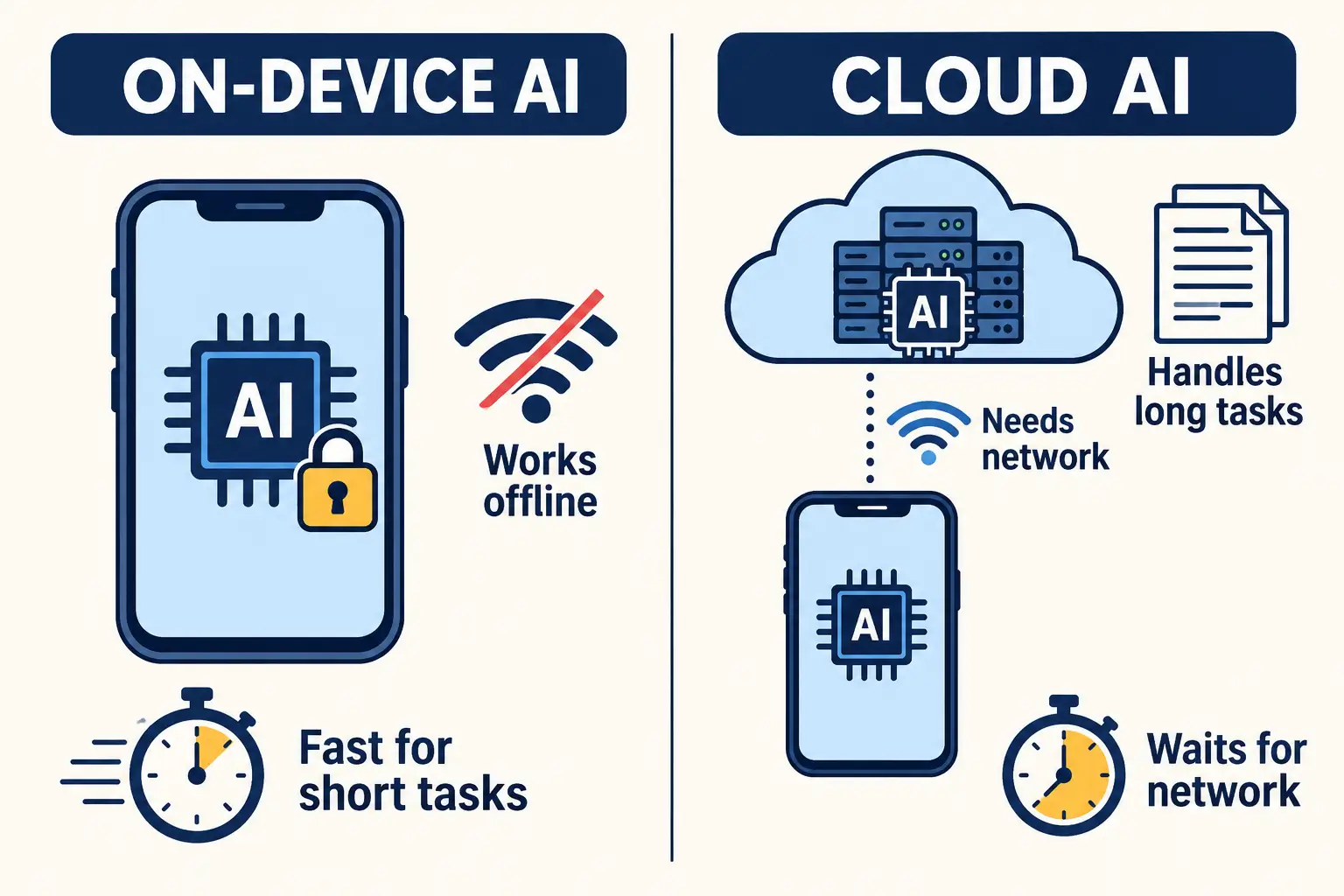
The on-device AI vs cloud AI decision usually starts with privacy, but the first number to check is how many tokens each request needs. A token is a small piece of text, roughly three to four characters in English. On-device models fit short tasks that must work offline and keep data on the phone. Cloud models fit long documents, long conversations, and deeper reasoning.
Apple’s documentation, for example, lists a 4,096-token context window per session for its on-device foundation model. A feature that needs more than the device allows will fail there, however private in the design.
Key takeaways
- Count tokens per request before choosing where a feature runs. It decides both the context-window fit and the wait before the first word appears.
- Apple’s documentation lists 4,096 tokens per session for its on-device model and 32K for its Private Cloud Compute model, which needs a network and has a daily usage limit.
- On-device processing time grows with prompt length. A long prompt can feel slower on a phone than a short one in the cloud.
- Google’s Gemini Nano APIs on Android run only while the app is in the foreground and enforces per-app quotas.
- Most retail features end up hybrid: short, private tasks on the device and long or complex ones in the cloud. Getting the on-device AI vs cloud AI split right starts with measuring tokens per request before writing any code
Two teams, one in-store assistant, two different walls
Here is an illustrative example. Two product teams at mid-size retailers build the same feature: an assistant on store associates’ phones that answers product questions and summarizes a customer’s order history during a conversation.
The first team chose on-device processing for privacy and offline use, since store Wi-Fi is patchy near the stockroom. The demo went well with short questions. Then a store manager tested a real case: a loyal customer with a long order history, plus a product catalog page pasted in for comparison. The session ran out of context partway through the conversation, and the assistant stopped answering.
The second team chose a cloud model for its larger context window. Long history worked well at headquarters. In the store, answers stalled in dead spots on the shop floor, and associates went back to check stock and orders by hand.
Neither team checked the same two numbers first: how many tokens a typical request uses, and where the device will be when it sends one. Both are cheap to measure before any code is written, and both shape the retail technology that associates rely on every day.
On-Device or Cloud? Size Your AI Feature First
We measure token use, latency and connectivity for your AI feature, so you choose where it runs before your team commits to a design. <
The latency number nobody checks first
Most teams treat On-Device AI vs Cloud AI, or edge ai vs cloud inference as a contest between network delay and on-device speed. The number that matters more is how long the model takes to read the prompt before it writes its first word, and that time grows with every token you send.
Apple’s most recently published speed figures for its on-device model date from 2024. On an iPhone 15 Pro, the Apple Intelligence on-device model reached “about 0.6 millisecond per prompt token” for time to first token, and a generation rate of 30 tokens per second (Apple Machine Learning Research, June 2024).
A rough calculation from those figures shows the effect. A 400-token prompt waits about a quarter of a second for the first word. A prompt that fills out the full 4,096-token window waits about 2.5 seconds, and a 200-token answer then takes roughly 7 more seconds to write. These are estimates from Apple’s 2024 numbers. In June 2026, Apple introduced its third generation of foundation models, including AFM 3 Core, a 3-billion-parameter on-device model, but it has not yet published updated speed figures for them. Newer chips will be faster, so test the devices your users carry.
The cloud has its own delay. Apple’s Private Cloud Compute documentation notes that it requires a network connection, and that deeper reasoning levels of trade latency for more analysis. On a weak store connection, the round trip can cost more time than the model itself.
Hardware is improving quickly. Gartner forecasts GenAI smartphone spending of $393.3 billion in 2026, up 32% from 2025. Analyst Ranjit Atwal said new neural processing units (NPUs) “will allow GenAI models to run faster and more efficiently.” Faster chips shorten the wait, but they do not raise the context limit.
Test Real Latency on Real Store Devices
We benchmark your AI feature on the phones and connections your associates use every day, so the experience holds up on the shop floor.
On-device AI vs cloud AI, side by side
The table compares the two placements using vendor documentation. The on-device column reflects Apple’s Apple Intelligence on-device model and Google’s Gemini Nano; the cloud column reflects Apple’s Private Cloud Compute and typical hosted model APIs.
| Factor | On-device AI | Cloud AI |
| Context window | 4,096 tokens per session listed for Apple’s on-device model; check contextSize at runtime | 32K tokens on Apple’s Private Cloud Compute model; often larger on other hosted models |
| Latency | No network wait; reading time grows with prompt length | Network round trip plus server processing; deeper reasoning adds time |
| Privacy | Data stays on the phone | Depends on the provider; Apple states Private Cloud Compute preserves privacy |
| Offline use | Works without a connection | Needs a connection |
| Usage limits | Apple: unlimited on device; Google: per-app quotas and foreground-only use | Apple: daily limit per user; hosted APIs: rate limits and per-call cost |
| Cost per request | No server cost per call | Paid per call or per token on most hosted APIs |
Two documentation points stand out. Apple’s technote TN3193 says that instructions, prompts, tool definitions and all model responses count toward the 4,096 tokens, and that the framework throws an exceeded Context WindowSize error when the limit is reached. Google’s ML Kit GenAI documentation says Gemini Nano inference is “permitted only when the app is the top foreground application.”
This is the core of any edge ai vs cloud inference decision, and the reason an on-device AI vs cloud AI choice should start with the table: each side has a hard limit, and the feature design has to respect it from the start.
A hybrid split that routes each request
A hybrid on-device cloud AI architecture sends each request to the place that fits it, using rules written into the app. Apple’s guidance for private cloud compute ai follows the same idea: start with the on-device model, evaluate the feature, and move to Private Cloud Compute if it needs more reasoning or context. This routing logic is the practical core of any on-device AI vs cloud AI strategy for a retail app.
A practical routing order for a retail associate app looks like this:
- Count the tokens first. Measure instructions, the user’s question, and any attached data before sending.
- Keep short, private tasks on the device. Product lookups, short summaries, and tone rewrites stay local and work offline.
- Split long tasks where possible. Apple’s technote suggests breaking long inputs into chunks across separate sessions or retrieving only the relevant snippets.
- Send long or complex tasks to the cloud. Full order histories, long documents, and multi-step reasoning go to the larger model.
- Fall back when the network drops. Apple’s guidance says to retry with the on-device model if a Private Cloud Compute request fails for lack of a connection.
- Show usage limits in the interface. Daily quotas on Private Cloud Compute and per-app quotas on Android need clear messages, not silent failures.
Build a Hybrid AI Feature That Works on and Off the Network
We design the routing rules, fallbacks and quota handling that let your app run short tasks on the device and longer ones in the cloud.
What changed for developers in 2026
The choice is no longer strictly one or the other on Apple devices. In June 2026, Apple introduced its third generation of foundation models, and it now offers private cloud compute ai to developers through the same Foundation Models framework, with a one-line change to switch a session from the on-device model to the server model.
Private Cloud Compute is available on iOS 27 and later and requires an approved entitlement. Each user has a daily request limit, which grows with an iCloud+ subscription. In its WWDC26 session on what is new in the Foundation Models framework, Apple said developers with fewer than 2 million first-time downloads pay no cloud API costs.
Apple also added a contextSize property in iOS 26.4 and recommends reading it at runtime, because the available context can differ by device and OS version. Build the app to check this value instead of hard coding with a single limit.
On Android, Gemini Nano is spreading across more devices, but feature availability still varies by device model and Gemini Nano version. Teams serving both platforms need a cloud path for devices that cannot run the local model.
For retail teams, this means the On-Device AI vs Cloud AI decision is more practical to resolve with a hybrid architecture than it was a year ago. It still needs a planned route to the cloud for requests that do not fit. Our post on omnichannel retail with AI-powered experience design covers how these features fit the wider customer journey, and our overview of AI, cloud and edge technology trends adds the infrastructure context. ViitorCloud has built similar hybrid AI features for retail teams working around patchy in-store connectivity, and shares the architecture decisions as they ship.
Map your feature before you pick a side
Settling on-device AI vs cloud AI starts with three measurements: tokens per request, the connection quality where the app is used, and the privacy needs of the data. ViitorCloud’s custom AI solutions team helps retail and product teams take these measurements and design a split that holds up in stores. To review a feature you are planning, talk to our team.

Vishal Shukla
Vishal Shukla is Vice President of Technology at ViitorCloud Technologies.
Frequently Asked Questions
What is the main difference between on-device AI vs cloud AI?
On-device AI runs the model on the phone or computer, so it works offline, keeps data local and has no per-call server cost. Cloud AI runs on remote servers, so it supports larger context windows and stronger reasoning but needs a network connection and usually costs money per request. Most products use both.
What is the context window of Apple's on-device model?
Is on-device AI faster than cloud AI?
Does on-device AI work offline?
When should a retail app use a hybrid on-device and cloud design?